github action 使用
大约 5 分钟
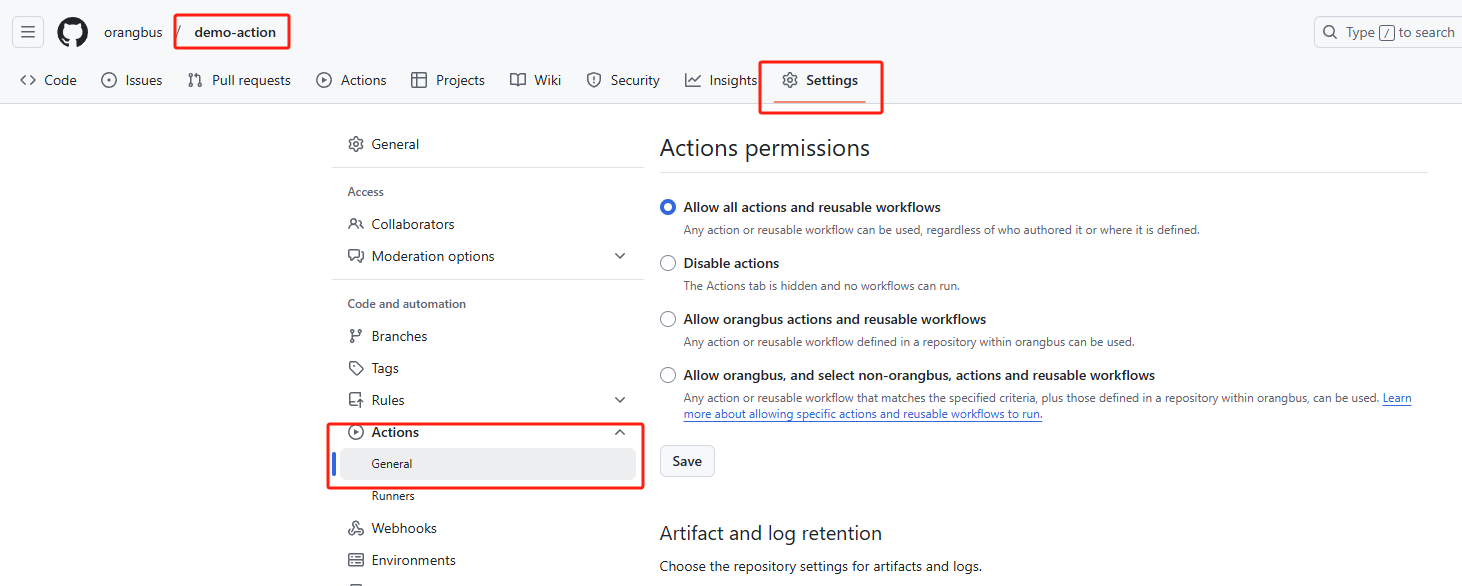
确保 GitHub Actions 有权限操作 Releases。在仓库的
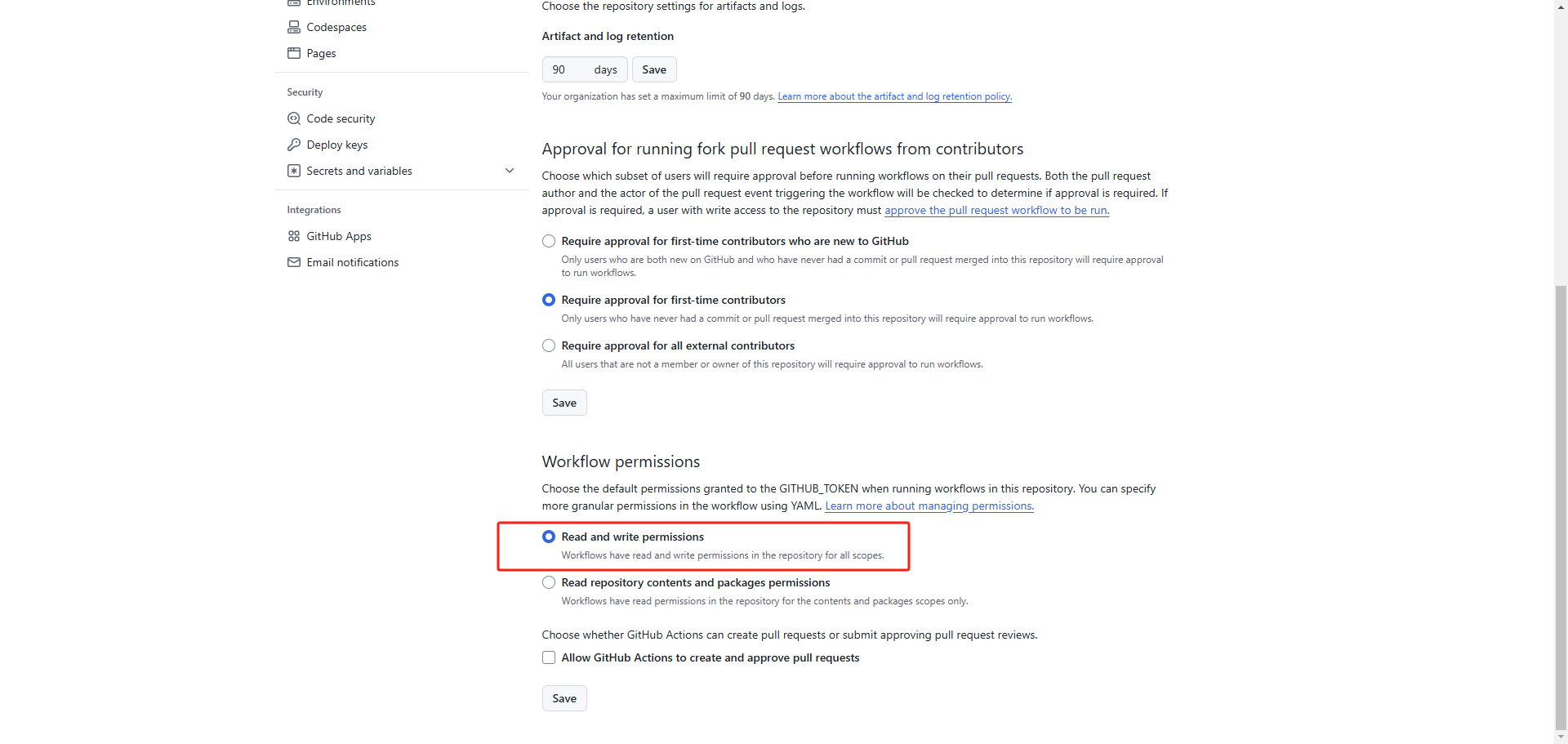
Settings>Actions>Permissions中,确保Read and write permissions被开启。
name: Example Workflow

on: push

permissions:
  contents: write  # 允许工作流对仓库内容进行写入操作

jobs:
  build:
    runs-on: ubuntu-latest
    steps:
      - name: Checkout code
        uses: actions/checkout@v4

      - name: Modify a file
        run: |
          echo "Hello, World!" > hello.txt
          git config --global user.name "github-actions"
          git config --global user.email "github-actions@github.com"
          git add hello.txt
          git commit -m "Add hello.txt"
          git push
on 事件
on:
  push:
    tags:
      - 'v*'  # 匹配以 'v' 开头的标签,例如 v1.0.0
on:
  push:
    tags:
      - 'v*' # 监听以 v 开头的标签
    pull_request:
      branches:
        - master # 监听 master 分支的 PR
jobs
指定环境
jobs:
    runs-on: ubuntu-latest
steps步骤
选择分支
https://github.com/actions/checkout
jobs:
    runs-on: ubuntu-latest
    steps:
      - name: Checkout
        uses: actions/checkout@v4
nodejs
jobs:
 steps:
    - name: 设置 Node.js
        uses: actions/setup-node@v3
        with:
          node-version: 20
          cache: npm
发布tag包
https://github.com/softprops/action-gh-release
目录结构
│  release-notes.md # 添加本次发布的更新说明
├─.github
│  └─workflows
│          deploy-release.yml
eploy-release.yml
name: Release

on:
  push:
    tags:
      - 'v*'  # 匹配以 'v' 开头的标签,例如 v1.0.0

jobs:
  build:
    runs-on: ubuntu-latest

    steps:
      - name: Checkout code
        uses: actions/checkout@v4

      - name: Create Release
        uses: softprops/action-gh-release@v2
        with:
          token: ${{ secrets.GITHUB_TOKEN }} # GITHUB_TOKEN 默认的账号
          tag_name: ${{ github.ref_name }}  # 使用推送的 tag 名称
          name: ${{ github.ref_name }}     # Release 名称
          draft: false                     # 是否为草稿
          prerelease: false                # 是否为预发布版本
          body_path: ./release-notes.md    # 当前项目根目录的 Markdown 文件路径,下面方式二选一
          body: |
            发布说明
            # 示例:
      - name: update package
        run: go list -m -versions github.com/orangbus/spider@${{github.ref_name}}
tips: 需要开启当前仓库的action read and write 权限
编译上传dockerhub
https://github.com/docker/build-push-action
此action会发布一个tag的版本号跟一个latest
1、初始化git仓库
2、创建tag标签进行发布才会触发更新
git tag v1.0.0
git push origin|github v1.0.0
.github/workflows/docker-images.yml
name: 发布docker镜像

on:
  push:
    tags:
      - 'v*' # 监听以 v 开头的标签
    pull_request:
      branches:
        - master # 监听 master 分支的 PR

jobs:
  build:
    runs-on: ubuntu-latest
    steps:
      - name: Checkout code
        uses: actions/checkout@v4

      - name: Log in to Docker Hub
        uses: docker/login-action@v3
        with:
          username: ${{ secrets.DOCKER_USERNAME }}  # Docker Hub 用户名
          password: ${{ secrets.DOCKER_PASSWORD }}  # Docker Hub 密码

      - name: Extract Docker metadata
        id: meta
        uses: docker/metadata-action@v4
        with:
          images: orangbus/movie-cloud # 镜像的名称
          tags: |
            type=ref,event=tag
            type=ref,event=branch
            type=raw,value=latest,enable={{is_default_branch}}

      - name: Build and push Docker image
        uses: docker/build-push-action@v3
        with:
          context: .
          file: ./Dockerfile  # Dockerfile 的路径
          push: true
          tags: ${{ steps.meta.outputs.tags }}
          labels: ${{ steps.meta.outputs.labels }}
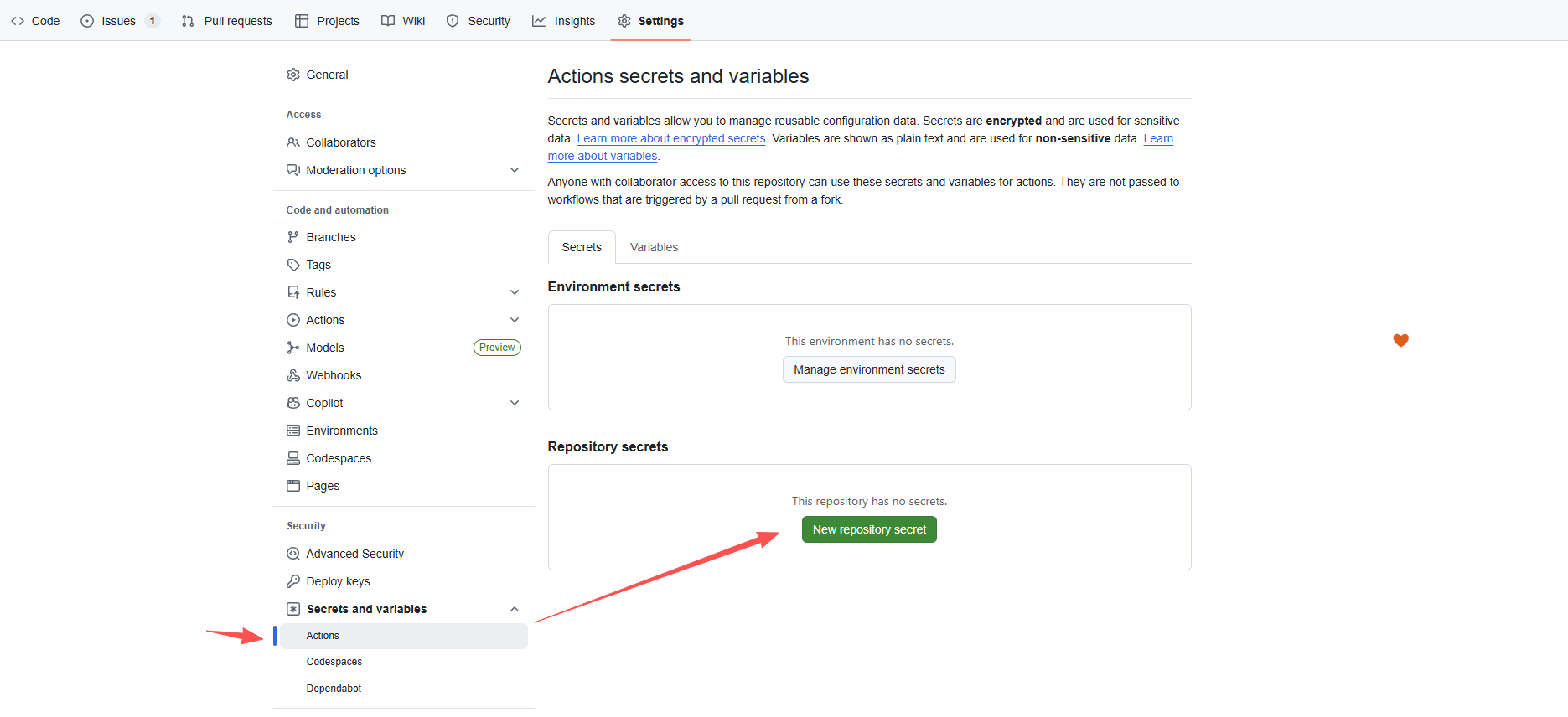
1、开启仓库的actions的读写权限
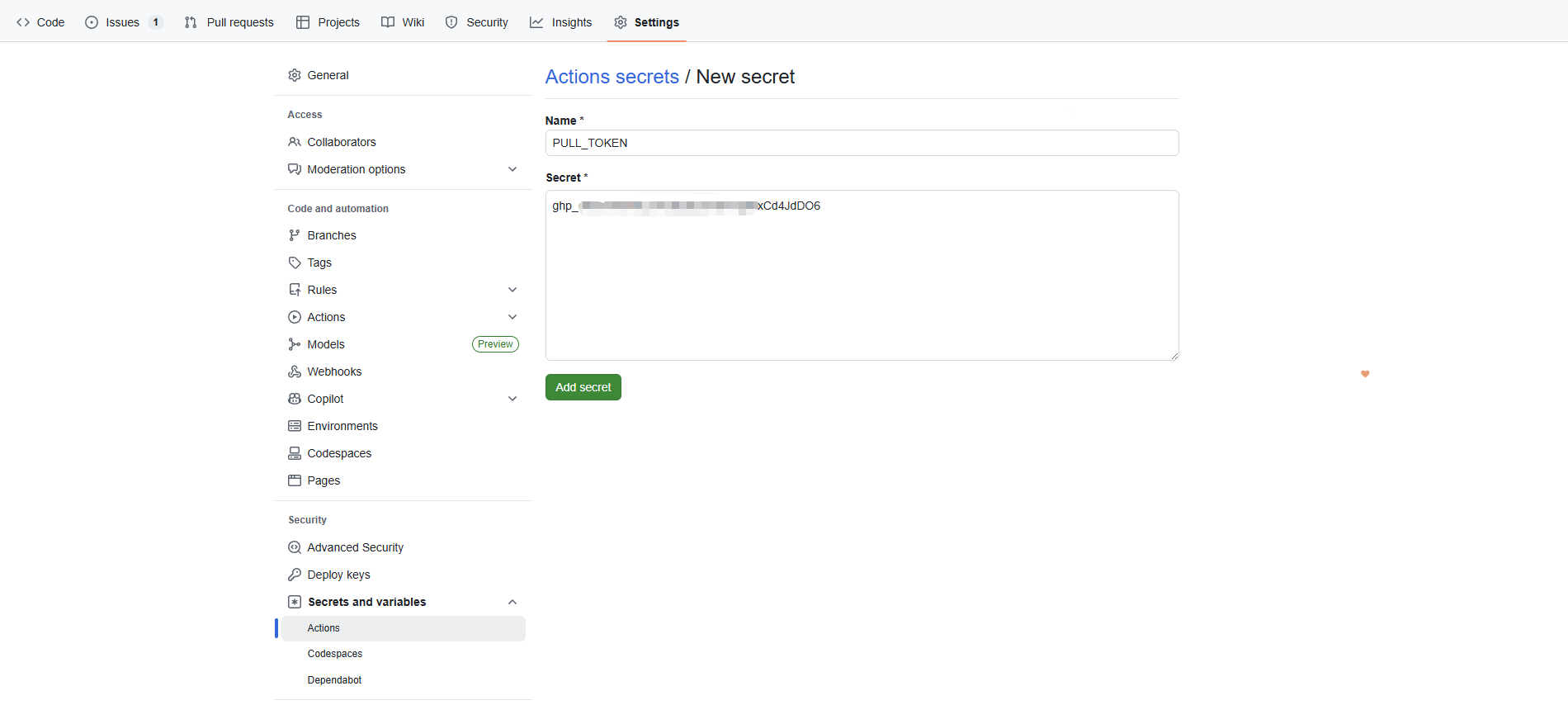
2、添加环境变量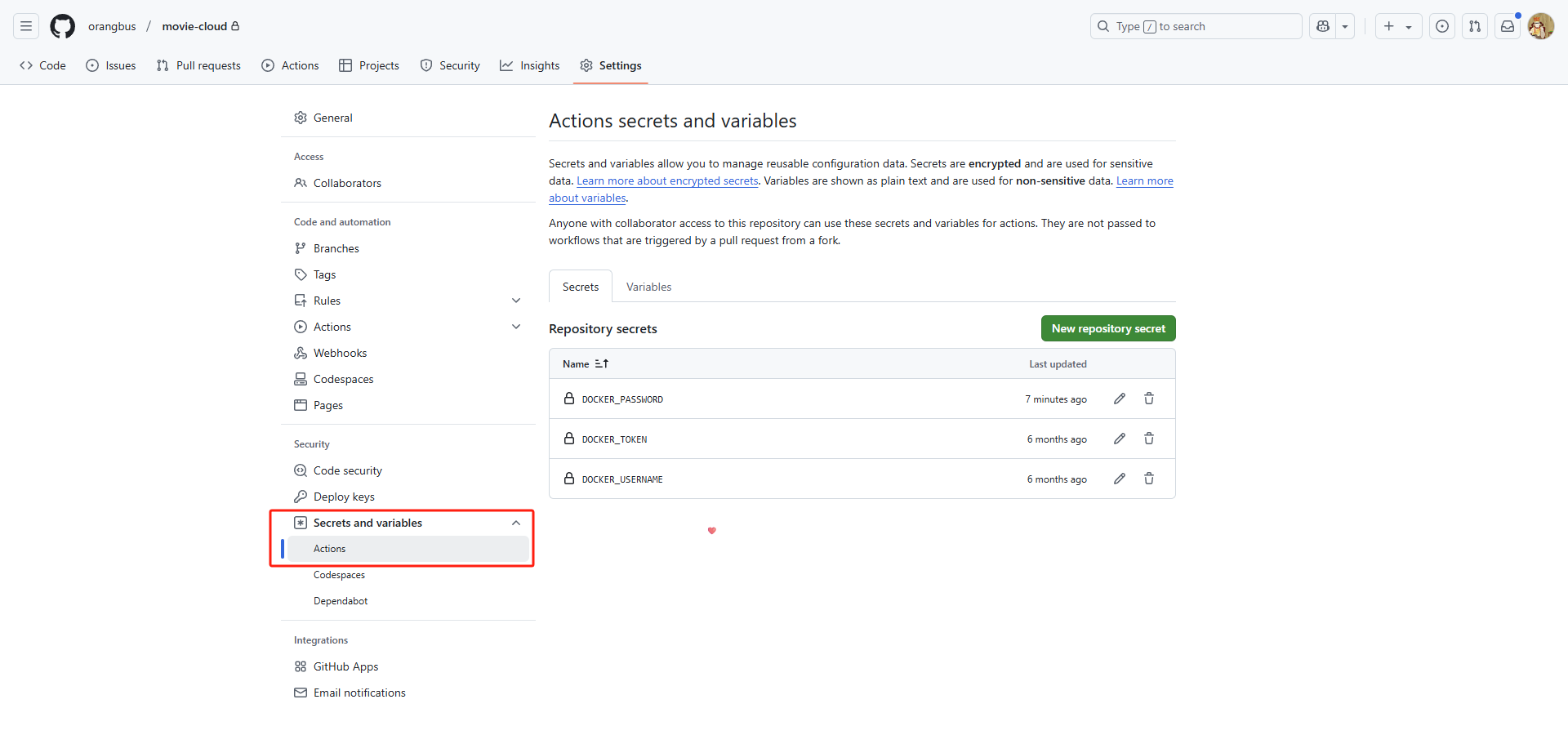
go打包发布
将go编译后的文件打包后发布出来
公有仓库打包私有仓库发布
需求:一个共有仓库,一个私有仓库,私有仓库的代码不对外公开,但是需要将私有仓库进行拉取,然后打包发布到Release中:.github/workflows/github-build.yml
name: 多平台编译打包并发布

on:
  workflow_dispatch: # 手动触发
  push:
    tags:
      - 'v*'  # 打Tag自动触发(如v1.0.0)

jobs:
  build-multi-platform:
    runs-on: ubuntu-latest
    permissions:
      contents: write  # 发布Releases权限
      packages: read   # 拉取依赖权限

    # 多平台矩阵:覆盖你需要的所有格式
    strategy:
      fail-fast: false  # 一个平台失败不影响其他平台
      matrix:
        include:
          # Windows amd64 (你的基础打包逻辑)
          - os: windows
            arch: amd64
            goos: windows
            goarch: amd64
            ext: .exe
            zipname: m3u8-downloader-windows-amd64-${{github.ref_name }}.zip
          # Linux amd64 (x86_64)
          - os: linux
            arch: amd64
            goos: linux
            goarch: amd64
            ext: ""
            zipname: m3u8-downloader-linux-amd64-${{github.ref_name }}.zip
          # Linux x86 (386)
          - os: linux
            arch: x86
            goos: linux
            goarch: 386
            ext: ""
            zipname: m3u8-downloader-linux-x86-${{github.ref_name }}.zip
          # Linux arm
          - os: linux
            arch: arm
            goos: linux
            goarch: arm
            goarch_variant: 7  # 适配armv7(主流嵌入式设备)
            ext: ""
            zipname: m3u8-downloader-linux-arm-${{github.ref_name }}.zip
           # macOS amd64 (Intel芯片)
          - os: macos
            arch: amd64
            goos: darwin  # Go的macOS标识是darwin
            goarch: amd64
            ext: ""
            zipname: m3u8-downloader-macos-amd64-${{github.ref_name }}.zip
           # macOS arm64 (M1/M2/M3芯片)
          - os: macos
            arch: arm64
            goos: darwin
            goarch: arm64
            ext: ""
            zipname: m3u8-downloader-macos-arm64-${{github.ref_name }}.zip

    steps:
      - name: 直接使用Token嵌入URL拉取私有仓库
        env:
          PAT: ${{ secrets.PULL_TOKEN }} # 需要到Github个人中心设置
          OWNER: ${{ secrets.PRIVATE_REPO_OWNER }} # gihub名称
          REPO_NAME: ${{ secrets.PRIVATE_REPO_NAME }} # 私有项目名称
          BRANCH: ${{ github.ref_name || 'master' }} # 当前打包的版本号:v0.0.1
        run: |
          # 提前检查关键变量是否为空
          if [ -z "$PAT" ]; then echo "❌ PAT变量为空,请检查Secrets配置"; exit 1; fi
          if [ -z "$OWNER" ]; then echo "❌ OWNER变量为空,请检查Secrets配置"; exit 1; fi
          if [ -z "$REPO_NAME" ]; then echo "❌ REPO_NAME变量为空,请检查Secrets配置"; exit 1; fi
          # 方案1:直接在克隆URL中嵌入Token(最稳定的鉴权方式)
          git clone https://$PAT@github.com/$OWNER/$REPO_NAME.git private-repo --depth=1
          # 进入仓库目录,配置用户信息(避免后续操作警告)
          cd private-repo
          git config user.name "GitHub Action"
          git config user.email "action@github.com"
          # 验证拉取结果
          echo "✅ 私有仓库拉取成功,当前目录文件:"
          pwd
          ls -la

      - name: 设置Go环境
        uses: actions/setup-go@v5
        with:
          go-version: '1.24.0'  # 替换为你的Go版本
          cache-dependency-path: private-repo/go.sum

      - name: 编译Go程序(跨平台)
        run: |
          cd private-repo
          # 安装依赖
          go mod tidy
          # 设置跨平台编译环境变量
          export GOOS=${{ matrix.goos }}
          export GOARCH=${{ matrix.goarch }}
          # ARM架构需指定变体
          ${{ matrix.goarch_variant && format('export GOARM={0}', matrix.goarch_variant) || '' }}
          # 编译(保持你的ldflags参数,静态编译)
          go build --ldflags "-extldflags -static" -o main${{ matrix.ext }} .
          # 验证编译产物
          ls -la main${{ matrix.ext }}

      - name: 打包产物(统一逻辑)
        run: |
          cd private-repo
          # 创建临时目录,整理要打包的文件
          mkdir -p m3u8-downloader m3u8-downloader/web m3u8-downloader/download
          # 初始化表接口
          go run . artisan migrate
          # 复制编译后的主程序
          cp main${{ matrix.ext }} m3u8-downloader/
          # 复制指定目录/文件(保持你的目录结构)
          cp -r storage m3u8-downloader/ || echo "storage目录不存在,跳过"
          cp -r resources m3u8-downloader/ || echo "resources目录不存在,跳过"
          cp .env m3u8-downloader/env || echo ".env文件不存在,跳过"
          cp db.sqlite m3u8-downloader/db.sqlite || echo ".env文件不存在,跳过"
          cp -r web/dist m3u8-downloader/web/ || echo "web/dist目录不存在,跳过"
          echo "修改env为.env,window双击 main.exe 启动,其他平台类似" > m3u8-downloader/新手说明.txt

          # 压缩为zip(不同平台生成不同名称)
          zip -r ../${{ matrix.zipname }} m3u8-downloader/*
          # 回到根目录,验证压缩包
          cd ..
          ls -la ${{ matrix.zipname }}

      - name: 发布到Releases
        uses: softprops/action-gh-release@v2
        with:
          files: |
            ${{ matrix.zipname }}
          tag_name: ${{ github.ref_name }}
          name: Release ${{ github.ref_name }}
          body_path: private-repo/release-notes.md
          draft: false
          prerelease: false
        env:
          GITHUB_TOKEN: ${{ secrets.GITHUB_TOKEN }}  # 开源仓库默认Token
PULL_TOKEN 获取方式
1、打开github的个人中心
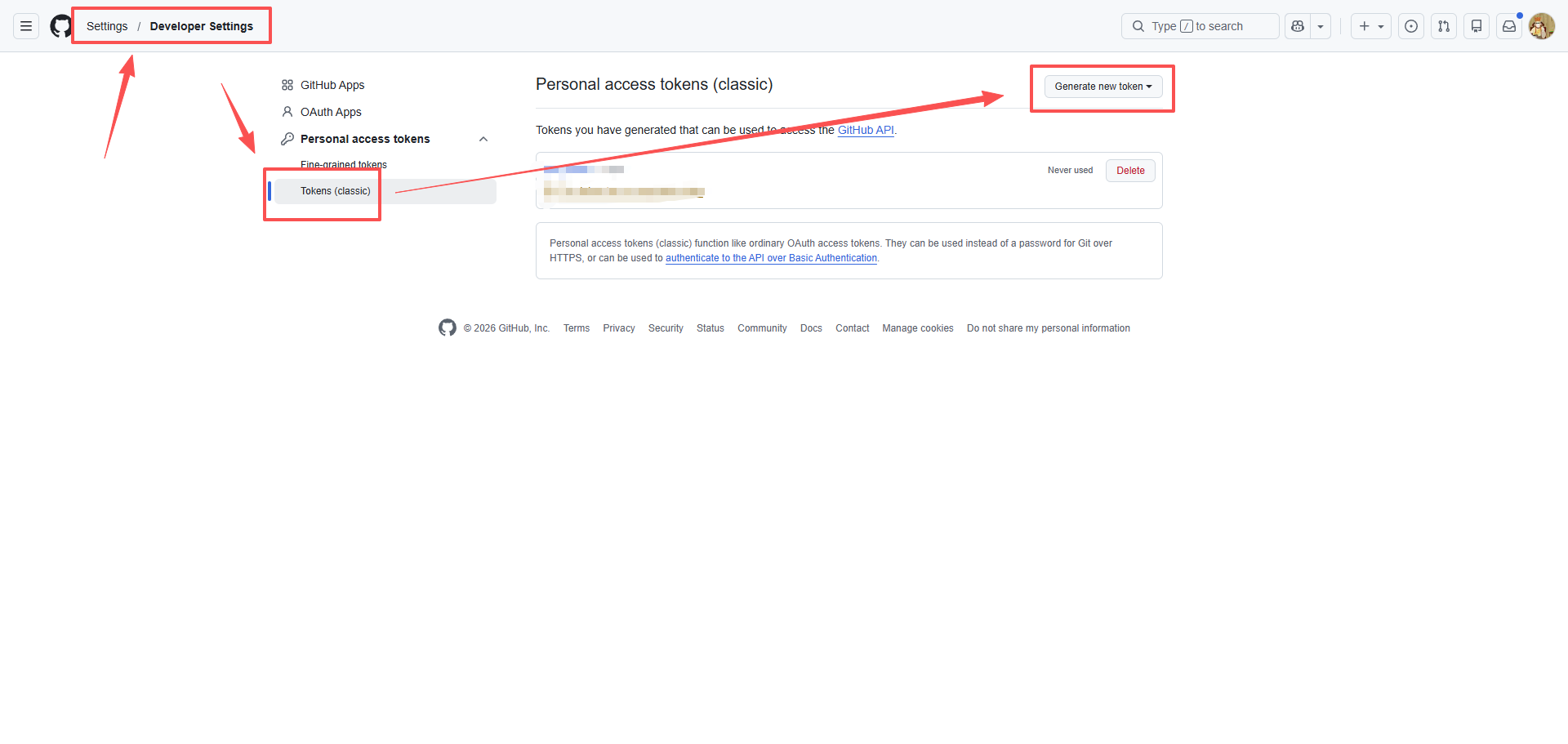
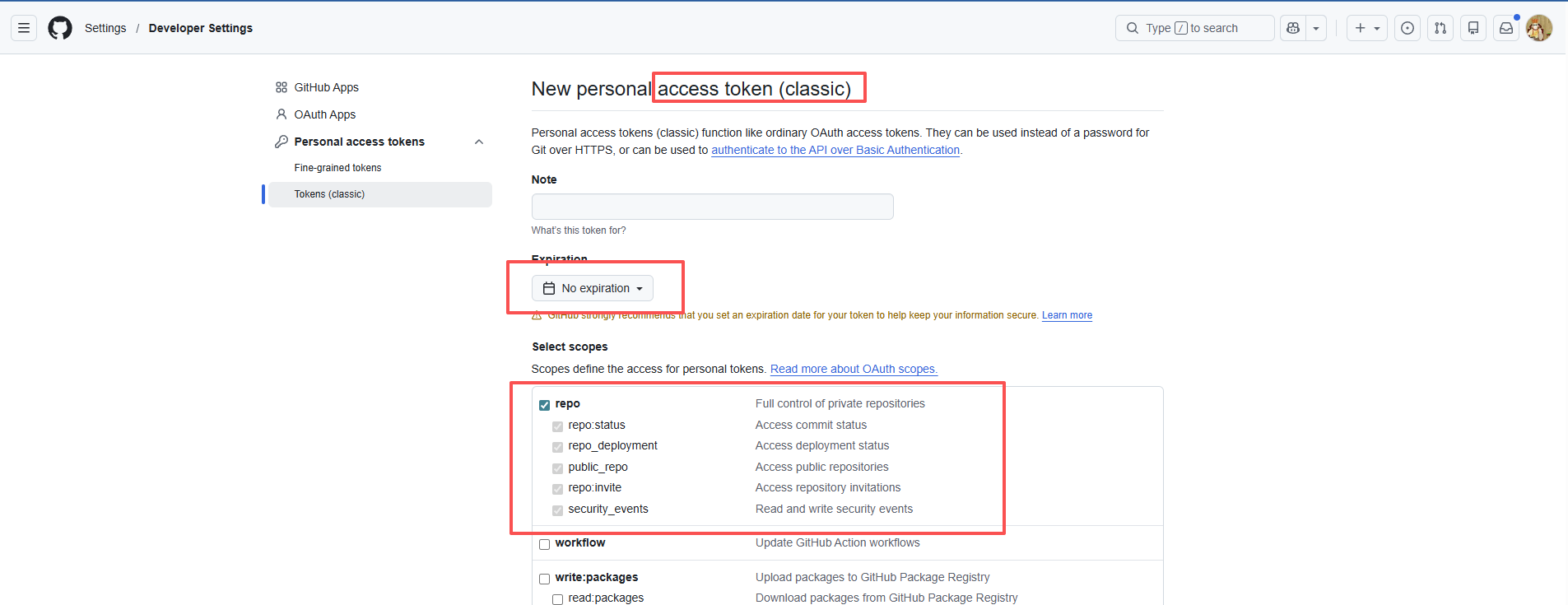
2、点击确定后会得到一个秘钥,只会显示一次,需要自己保存。
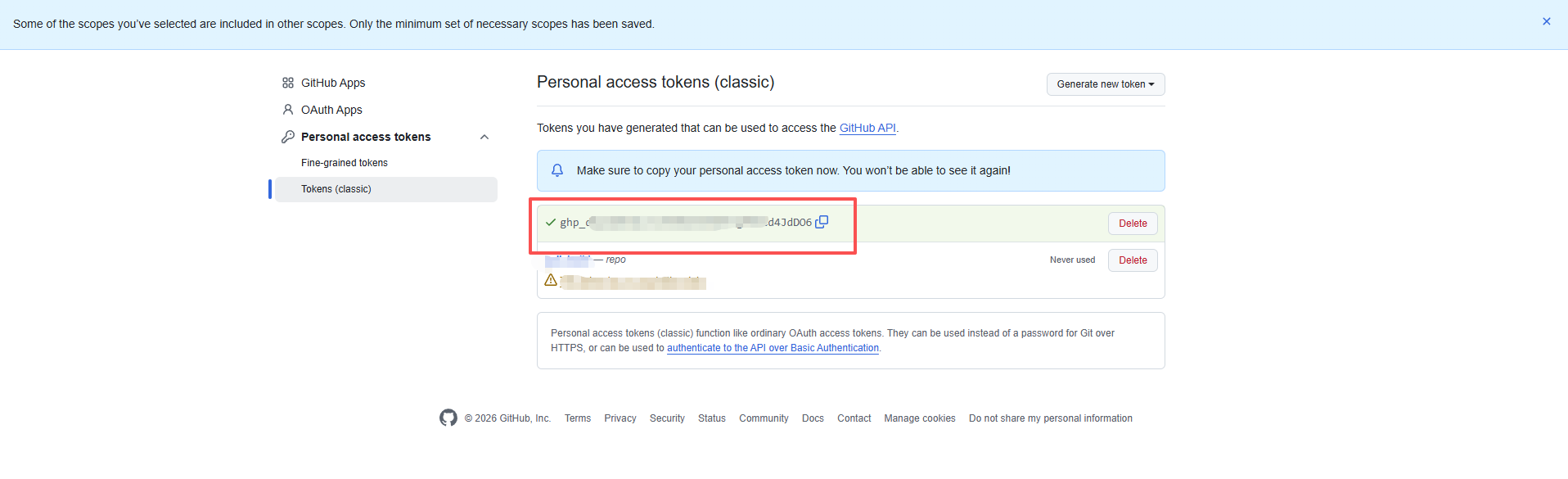
3、回到共有仓库设置变量名保存即可。