
Git 配置
大约 2 分钟
git设置默认分支
当我们的仓库有多个仓库源的时候,我们想把某个仓库源设置为默认的,可以这样设置
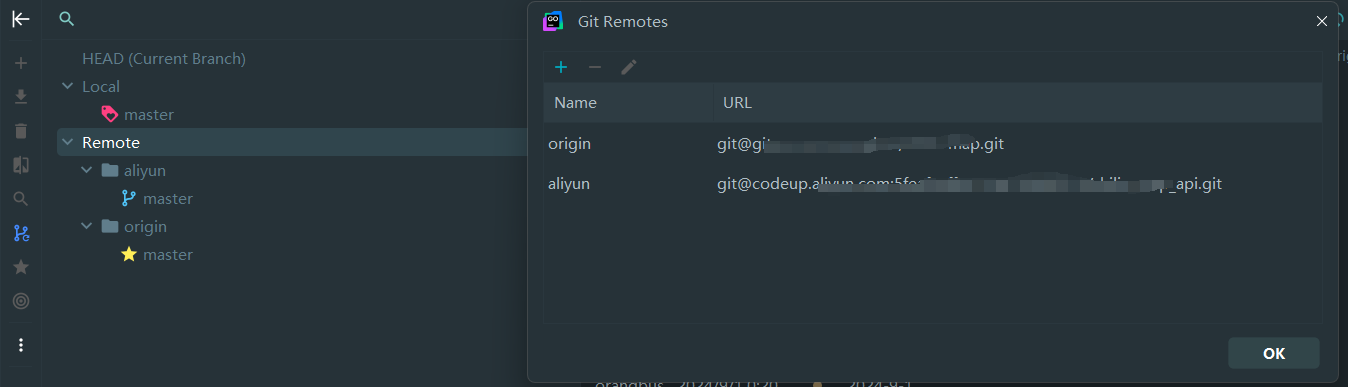
git branch --set-upstream-to=<remote-name>/<branch-name>
这里 <remote-name> 是你想要设置为默认的远程仓库的名称,<branch-name> 是你想要跟踪的分支名称
git branch --set-upstream-to=origin/master
如果想设置 aliyun
git branch --set-upstream-to=aliyun/master
如果你的主分支不叫 master 而是 main
git branch --set-upstream-to=origin/main
git缓存清理(解决ignore不生效问题)
git rm -r --cached .

git add .
git commit -m '重新提交一下'
git push origin master --force
配置多个 SSH-Key
当有多个 git 账号时,比如:
a. 一个 gitee,用于公司内部的工作开发
b. 一个 github,用于自己进行一些开发活动
解决方法
- 生成一个公司用的 SSH-Key
ssh-keygen -t rsa -C 'orangbus'
ssh-keygen -t rsa -C 'gitee' -f ~/.ssh/gitee_id_rsa
- 生成一个 github 用的 SSH-Key
ssh-keygen -t rsa -C 'github' -f ~/.ssh/github_id_rsa
ssh-keygen -t rsa -C 'aliyun' -f ~/.ssh/aliyun_id_rsa
- 在 ~/.ssh 目录下新建一个 config 文件,添加如下内容(其中 Host 和 HostName 填写 git 服务器的域名,IdentityFile 指定私钥的路径)
vim ~/.ssh/config
# gitee
Host gitee.com
HostName gitee.com
HostkeyAlgorithms +ssh-rsa
IdentityFile ~/.ssh/gitee_id_rsa

# github
Host github.com
HostName github.com
PreferredAuthentications publickey
IdentityFile ~/.ssh/github_id_rsa

# github
Host codeup.aliyun.com
HostName codeup.aliyun.com
PreferredAuthentications publickey
IdentityFile ~/.ssh/aliyun_id_rsa

# 工蜂需要的参数
HostKeyAlgorithms +ssh-rsa
PubkeyAcceptedAlgorithms +ssh-rsa
- 用 ssh 命令分别测试
ssh -T git@gitee.com
ssh -T git@github.com
ssh -T git@codeup.aliyun.com
这里以 gitee 为例,成功的话会返回下图内容

Git代理配置
查看配置
git config --list
配置代理
git config --global http.https://github.com.proxy http://127.0.0.1:10808
git config --global https.https://github.com.proxy http://127.0.0.1:10808
git config --global http.proxy http://127.0.0.1:10808
git config --global https.proxy http://127.0.0.1:10808
取消代理
git config --global --unset http.proxy
git config --global --unset https.proxy
Npm配置代理
npm config list
设置代理
npm config set proxy http://127.0.0.1:10808
npm config set https-proxy http://127.0.0.1:10808
取消
npm config delete proxy
npm config delete https-proxy
composer 配置代理
Linux/Mac
export http_proxy=http://127.0.0.1:20172
export https_proxy=https://127.0.0.1:20172
Windows (CMD)
set http_proxy=http://代理服务器地址:端口号
set https_proxy=https://代理服务器地址:端口号
Windows (PowerShell)
$env:http_proxy = "http://代理服务器地址:端口号"
$env:https_proxy = "https://代理服务器地址:端口号"
直接修改配置文件(永久生效)
编辑 Composer 全局配置文件 config.json:
Linux/Mac 路径:~/.composer/config.json
Windows 路径:C:\Users\用户名\AppData\Roaming\Composer\config.json 添加或修改代理配置:
{
    "config": {
        "http.proxy": "http://127.0.0.1:10808",
        "https.proxy": "https://代理服务器地址:端口号"
    }
}
清除代理
composer config -g --unset http.proxy
composer config -g --unset https.proxy
验证代理
composer config -g -l
遇到问题
Bad owner or permissions on .ssh/config的解决 当为本机配一个固定用户名远程登录某主机时,配置了一个config文件,但是在执行ssh免密码登录时报如下的错误:Bad owner or permissions on .ssh/config的解决
sudo chmod 600 ~/ssh/config